UPDATE: Due to changes within Blogger, this fix has become obsolete.
Are you not receiving replies to the nice comments that you leave on other peoples blogs? Do you have to go back to their blog to see if they replied? The reason you’re not getting the replies may be because you are a noreply-comment on blogger.
This morning Eva from Tales of the Scotts left me a comment telling me that I was a no-reply blogger. She also referred me to one of her posts on how to fix the problem. Her post was very informative if you have a blogger profile. Unfortunately, I switched to Google+ and her post didn’t help me. From doing some research on how to fix this I found that a lot of people have been experiencing the same thing when they switched to Google+. It took me a while to figure out how to fix it but once I found the solution it was pretty easy.
Blogger Profile – follow steps 5-7
Google+ Profile – follow steps 2-9
Step 1 – Check to see if you are a noreply blogger
- Make a comment on your own blog
- Check your email to see if you received the comment
- Check to see who the email is from. Is it your email address? or “[email protected]
- If it is from [email protected], than you are a No-Reply Blogger and will need to make some changes.
Step 2 – Go to your Blogger dashboard
- Click on the gear in the upper right hand corner
- Choose “Revert to Blogger Profile” (this is only temporary)
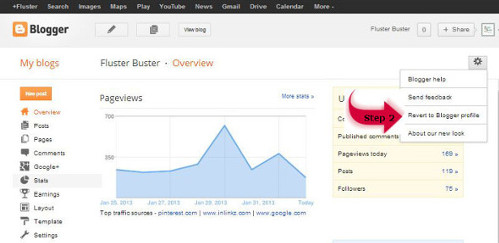
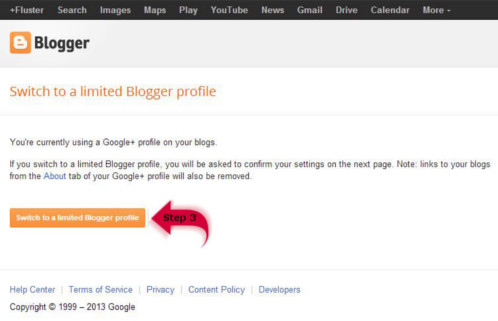
Step 3 – Switch your Profile
- Click on “Switch to a limited Blogger Profile”
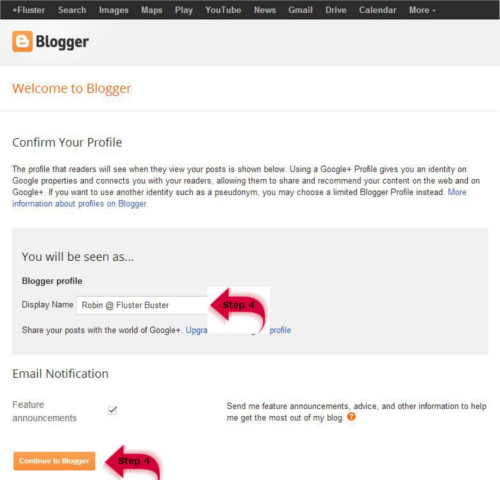
Step 4 – Confirm your Profile
- Fill out “Display Name”
- Click on ” Continue to Blogger”
Step 5 – Back to the Blogger dashboard
- Click on your name in the upper right hand corner
- In the drop down box click on “Blogger Profile”
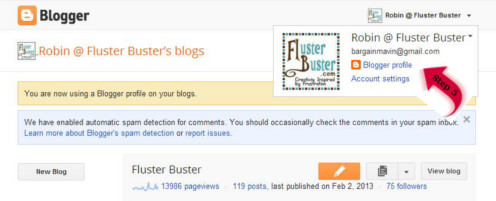
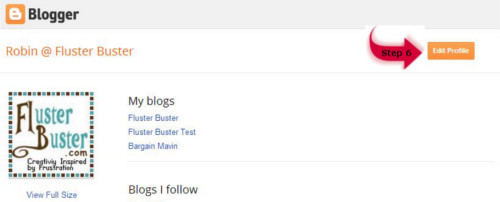
Step 6 – Edit your Profile
- Click on “Edit Profile” in the upper right hand corner
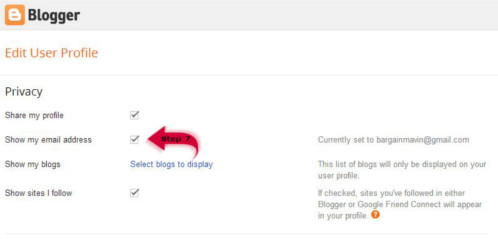
Step 7 – Changing Email Settings
- Check the box “Show my Email Address”
- Click on “Save Profile” at the bottom of the page
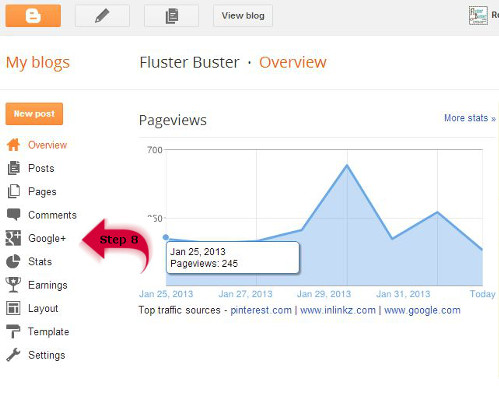
Step 8 – Switching back to Google+
- Go back to your blogs dash board
- Click on “Google+
- On the next page click on “Upgrade to Google+”
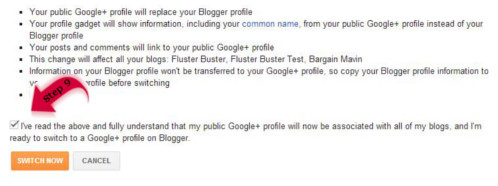
Step 9 – Connect to Google+
- At the bottom of the page check the box
- Click on “Switch Now”
Now you will be able to view all of the replies to your comments.
UPDATE: Be sure to check your status periodically! I’ve found that it can revert back to a no-reply status. I haven’t figured out why yet, but my best guess is that it has something to do with making changes to either Blogger or Google+. I’ve made it a habit to check it whenever I make any changes and I also check it once a month just to be sure.
thanks for posting this!
Glad you were able to get it fixed!! And thanks for linking back to me 🙂
Eva
Love it! I can't stand not being able to reply to my comments.. Pinning this to spread the great tutorial.. Hopefully everyone will see it and change their settings 🙂
This is a huge problem and the reason I quit doing Google + Thank you so much for posting this! Awesome!
I think I did it! yay
I just switched to Google+ and didn't realize that this might be an issue! Thanks for the tutorial – I'm thinking it's fixed now! Have a great week!
Danielle
Thank you for this great tutorial! I'm sharing it with other bloggers when they comment on my blog and I can't reply to them. =) Have a great week!
Um…that was insanely enlightening! Thank you!
Thanks for the info – enjoy the rest of your week!
Lol, not only was I a no reply blogger-I had never received an email from comments left ever. Seems I had an email account I didn't realize I had! Thanks for posting.
Thank you for your help! Now maybe I will start seeing replys to my comments! 🙂
Thank you so much for such an understandable post! I have knew something had gone wrong, but didn't know where to remedy it! I hope I have it fixed now!
I am sure I am a no reply blogger so I am out to change that!! Thank you for the tip, I can use all the help I can get. Have a great day, oh by the way I found you via The Blackberry Vine link party.
Maybe I'm just the silent type.
Ha. Just kidding. Thanks for the info!
Does Google upgrade people to G+ automatically, or is that something you did on your own? I have a G+ account, but it wasn't connected to my Blogger account, last time I checked.
oh, wow–I had no idea! thanks!
This is really helpful thanks 🙂
Thank you, thank you, thank you! I have been wanting to change this for so long, but the tutorials haven't been for Google+ and I couldn't figure it out.
I really like your "follow us" buttons- so cute!
I'm not sure if I have a different version of Blogger or what, but I can't find how to do what you say to do. :/
You are a no-reply blogger. Contact me @ bargainmavin (@)gmail (dot)com and I will see if I can help you out.
Very interesting.
Thank you SO much for posting this….and with SO clear instructions. I realized not long ago that I was a no-reply commenter but like you wrote the tutorial was not for Google+. Can't wait to get the replies on my comments now, yay!
Personally one of things I hate about blogger is it's commenting system. They want to try to force you to sign into a google account! I am happy to see you have the full range of options open to commenter's here but on many people's blogs they don't and so without the name/url option I am unable to comment!
Mollyxxx
Thanks for this post. I never realized what switching to google+ meant. I think I fixed this problem, thanks to you.
Blessings,
Lisa
Gosh I wonder if I have this problem?!? Will check stat!
thanks very much!
did it, hope it worked- thanks!!
Thanks so much for the great tip! I'm going to check mine out right now! Have a wonderful weekend!
Good tutorial! Unfortunately many won't read!!! This and word verification drive me NUTS!!! (I even leave comments telling people and they don't change it!)
Wonderful tutorial! And, thanks for linking up at the Oldies party last week!
Pinning!
Your comment is appearing as a no-reply.
Great post – I am linking up to it on my Blog Tips blog tomorrow. Cheers
Thanks for sharing this at Rustic Restorations Weekend!
I never even thought about that when I switched my profile to google +..guess I'll have to investigate further 🙂 Thanks for sharing!
Your comment is appearing as a no-reply.
THANKS!!! Fixed it 😀
well done! xo P.S. thank you for sharing at the hop
Thanks so much for sharing this with everyone. I did not know about no reply for a long time and was so appreciative when someone shared how to fix it with me. Thanks so much for linking up at Totally Transformed Tuesday. xoxo Peggy~PJH Designs
Okay. I first couldn't figure it out. I could see my email when I posted on my blog, but I did click show my email anyway, and I am hoping that will change it. Can you let me know if it worked? Thank you so much for sharing this and letting me know at my blog. You are a dear. 🙂
Thank you for that info – I've noticed it is always fellow bloggers who are generous enough to help me navigate through the google system!
I took away my captcha and added moderation and started attending lots of linky parties. Then I started getting more comments, though I had to approve all the comments I wanted printed. I get about 5-10 spam comments a day that I delete.
Holy guacamole! That's a lot of link-ups! Do you ever go to Create With Joy? She has some great link-ups on MWFs. U ROCK for helping other bloggers figure out this "no-follow" business!
Following from Let's Get Social Sunday!
I was a non reply blogger for ages and didn't even know it. Thanks for sharing this helpful info with Share Your Cup.
hugs,
Jann
I get so many no reply comments – pinning this to share 😉 Thank you for sharing at last week's week's All My Bloggy Friends 🙂
I really did not know I was until recently. I changed my profile when I was on blogger to Google+. Then I migrated my blog to WordPress. I'll give your steps a try and see how it works. I do appreciate you sharing with Home and Garden Thursday,
Kathy
Thank you for the help! I had no idea I too was a no-reply blogger! I know I am boring in comparison to all of you who create such beautiful things so thought I just wasn't getting a lot of comments. Maybe it will change now! Thanks again!
Bev
I cannot thank you enough for this
THANK YOU THANK YOU THANK YOU THANK YOU – see? still not enough!
Here I am with a no-reply comment fix on my blog – and then switched to Google + and had no Idea that I was a no reply blogger till this morning ( 1 month later ) how embarrassing!
I'm going to link this post if you don't mind, to my blog –
People shoud know about this!
You're the best really!
Hugs,
Suzan
Thank you! I never EVER received email comments because I didn't have my email listed originally! I've been baffled by this! Thanks so much for helping the non-techies!
I'd be careful switching back to Google+ … I went through this before, had it work for about a week, but it went back to "No Reply" and I think it was because I turned Google+ back on. So I turned it off, went through the process and left Google+ off. o_O (Hopefully I won't show up as "no-reply"!)
I did this to my account several weeks ago and I haven't had any problems with it reverting back to a no-reply. I love Google+ I would hate to have to turn it off, it's such a great way to connect with other bloggers as well as family and friends.
Hi! I had the same problem that Hilary did. I did this fix a while back and then today, I found some of my own comment replies in my spam file. I checked and sure enough, I was a no-reply blogger again. Grrr! I've just done the steps again and it worked when I checked it a minute ago, but it's probably a good idea to check yours every so often to make sure it sticks. This is sooo frustrating. I don't want to disconnect my G+ account either, but if it means not getting replies to my comments, I don't see any other way. Thanks for posting this tutorial, too… I'd forgotten how I did it the last time and this was a godsend. :~)
Thank you so much for the excellent tutorial and reminder. I constantly have to check mine, because it always goes back to no-reply. So frustrating!! Thanks so much for sharing at A Bouquet of Talent!! Have an awesome weekend.
Hugs
Kathy
Thank you so much-I didn't have a lot of hair left to pull out 😉
The tutorial was so step by step w/example pics-I was able to fix it myself-yeah me-a techno-goddess I am not but I feel a tiny bit like one now thanks to you.
I have been wondering how to fix this. Thanks so much for sharing! Please let me know if I didn't do it right 🙂
great tutorial!!!!
I found out today that this happened to me and stumbled upon your great tutorial. I think I'm all good now and have shared your genius on my FB Page! ( linked to you of course)
Great tutorial but it is not working! I have been dealing with this problem for months now. I have 4 blogs on this account and 2 of them are no-reply. Its maddening and I may have to switch those 2 blogs over to wordpress. boooooooooo
this is awesome, thank you so much!!
huggies♥
rea
Thanks for the information. Another blogger told me I was a non-response blogger but didn't know what that meant. Thanks for the help. Would you do me a favor and comment on my blog to see if it works? Thanks!!!
Please let me be the 78th person to say… Thank you, thank you, thank you! Because of your extremely helpful post, I am no longer a no-reply blogger! God bless you!
I kept getting some funky error message at Step 4, "Continue to Blogger". Then, after I switched back to Google+ and made a comment on a post it didn't show up at all in my email inbox. I just decided to forget Google+ (not that many connections through it anyway) and just go with a regular Google account. Now I can comment, see it in my email inbox and I'm no longer a no-reply Blogger. Thanks for the good info.
I just found this in another one of my blogs I follow. I just did the very 1st step & that explains it all! But….I do not have the pull down option to do the next step "revert to…" only "google +"…sooooo, not sure what to do next 🙁 Very sad. I'd love to fix this as I've had no comments for months & thought something odd was happening. Can you help me out? Thanks for the information! -Jessica
Oops…I feel silly…I just realized I didn't skip ahead. I'm sorry. That's what I get for being on the computer so late. I appreciate the help. Thank you!
Oh wow…I feel like such an idiot. I found the pull down after changing my profile to see my emails. But it gives these options: Blogger Help, Send Feedback, Google +, About our new look. I don't have the option to switch over (temporarily) to Revert to Blogger. Why is that? I know this must be such a simple thing to fix & for some reason I'm not seeing it. Thanks very much. -J
Thank you so much!!! Someone just told me I was a no-reply blogger and I always wondered why I didn't get replies to the comments I left. So I just googled "what is a no-reply blogger"? and your site came up. Thanks for the easy directions!!
It worked! Thanks for the email…you're such a sweetie!
So glad to have found this post. I was frustrated by showing up as a noreplycomment blogger. Thanks for the instructions.
Robin…I have a question…making this switch could make my account susceptible to be hacked? thank You
I just used your tutorial to fix my google+ no reply issue. Thank you!!! 🙂
Jessica
This only worked for a few days before it went back to noreplycomment. Others have experienced the same thing and warned me about it 🙁 How disappointing. Thanks anyway. Maybe Google will provide a permanent fix one day.
I have yet to experience this problem and have not heard of it being a problem for anyone else, until now. I fixed mine two months ago and it has worked perfectly ever since.
Thank you! I just fixed mine
Thanks;)
Thank you for this post. I came to this post from Alicia M. and changed my profile from no reply, which I was not aware of. I am curious to see if it works now. Thank you again. Dita
You just saved my butt! I had switched up my setting this morning and it set me to noreplyblogger. Stress to a ten! Thanks for the easy explanation on how to fix, crisis averted!
I can't figure out how to get comments emailed to you.
I can't figure out how to get my comments emailed to me in the first place.
Thank you for this tutorial 🙂 It was really easy & helpful in fixing my problem.
Thank you, thank you, thank you! Seriously!
Thank you, thank you, thank you! A million times, thank you! I have been trying to figure out a way to do this for ages and every time I went back to G+ I went back to being a no-reply blogger. I was seriously getting ready to pull my hair out. (or slap someone… lol) I'll be pointing all of my no-reply readers to this post in the future!
It worked!!! Thank you so much!
thanks ,,,
This is a great tutorial! Would you mind if I directed my readers to this post rather than trying to reinvent the wheel?
Deborah
Good Morning Robin, I am joining the hundred or so people to say A GREAT BIG THANK YOU. You know, since I discovered I was a "no reply blogger" I have literally been tearing my hair out trying to fix it. I followed other tutorials but with no luck, but then I left a comment for Suzan at Simply Vintageous and noticed she was pointing me in your direction. I really am grateful, so a BIG THANK YOU TO SUZAN FOR FINDING YOU and A BIG THANK YOU TO YOU, FOR HELPING so many of us to cure this frustrating problem.
I just wanted to say, you are one of the many generous bloggers I have come across during my short time of blogging, you are willing to share information to help other bloggers…..again thank you.
I am so pleased that I have become a new follower. If you would like to pop over and visit me at Ivy, Phyllis and Me! you will be more than welcome.
Have a truly lovely day.
Best Wishes
Daphne
incredibly helpful! Thank you.
yay…it worked…Thanks a million
Thank you I was having the hardest time trying to figure out what was going on especially since I was in Google + not the old format! Krista @ A Handful of Everything
I followed the steps and the email address box was already checked so I'm not sure if the problem was fixed in my case.
Mo
Hi Robyn. I've had several new followers lately who are no reply bloggers. I was going to write a post about it but yours is so well done. Would it be ok if, in my post about it, I were to refer people to your instructions rather than create my own? If you don't want me to, that's totally ok but I thought I'd ask before reinventing the wheel. Thanks.
Thank you, thank you, thank you!
So… I did this a couple months ago, it worked, and then it changed back. Guess I will try again. Dumb blogger. 🙁
It worked again. Hopefully it doesn't decide to change itself again. Thank you for posting this… again. 🙂
I know this is an older post, but I found it by googling. I always showed my email and people could reply to me, until just today I noticed it didn't anymore. It must have been the google+ thing. Thanks sooo much for posting this! I couldn't figure it out. I followed your directions and it worked perfectly. Thanks so much again!
I think I got it!
thank you!
I didn't know this is so important , Thank you I did all you say and hope I am now ok, I see you from Spain 🙂 bye
Thank you so much! This is SO helpful!
Was so glad to find your tutorial. Really hope I have it fixed and that it is working as it should now.:) I loved how easy this was to follow.
Thank you so much for this. I couldn't figure out how to do it with my Google + page linked.
Thank you sooooo much!!!!
I'm not more a no-reply blogger!!!
Thank youuuu!!!
Have a nice day!!
This is a great tip, which I'll share on my blog by pointing people here! Thanks so much for this simple solution :0)
Thank you so much! This just happened to me recently and I had no idea I was a no-reply blogger until someone contacted me about it. I'd been going in circles on how to fix it and would never have figured this out without your help. THANK YOU AGAIN!
Testing to see if I am a no reply blogger? Hope to hear back from you. Thanks!
thanks so much! Just fixed my settings. A friend just told me mine was doing this today.
Hi Robin, I actually had to do this again today….after I already did this some weeks back…somehow it converted back to non reply…so frustrating. I was wondering why nobody replied to my comments lately!!! Duhhhhhhh……has this happened to you?
This was so helpful! I read like 12 other post but I already was using google + so they did not help. Thanks again!
Thank you so much for this post! I linked you up on our blog today and I pinned you too! 🙂
Thanks for posting this! SO easy to follow!
thank you!!!
I just went through the steps. I hope it works. Thank you for sharing 🙂
Thank you so much for this post! I've been trying to figure it out. Now where's my "That was easy" button?
Hey Robin.. I'm linking back to this in my comment statement so other people can go to it and fix the issue.. It's crazy how many people have no idea 🙂
so glad i found this post.. thank you, thank you!
So Easy! Thanks. Am Pinning this and will be posting a blog post on this with a link back. Thanks again! 🙂
Thank you so much for posting this! It helped me so much! Very easy to follow! 🙂
Jamie
Life As I Know It
THANK YOU!! The ONLY tutorials people were showing was for Blogger profiles only! Thanks a bunch! Will be adding it to my "Blogging Tips" Pinterest board!
Michell @Prowess and Pearls
HELP!! I don't have the little orange B and "blogger profile" by my name. I am afraid to try what you suggest, in fear of loosing my blog completely. I am in such need of some personal tech help. Any suggestions as to where to turn for such help? I lost my blog completely last week when trying to change author email addresses. I have no idea why it came back, but have been have numerous troubles since. Here is my email address….quiltersmission at gmail dot com.
Thanks!! 🙂 MUST save this .
Hugs, Gee
You are awesome! I never would of figured this out!
Great post… It's been driving me crazy. Soon as my next comment comes thru hopefully it will work.
Thanks for sharing.
THANK YOU SO MUCH!! THOUGHT I WAS A COMMENTING BLOGGER BUT LIKE YOU WHEN I SWITCHED to G+ profile, IT CHANGED IT WITHOUT MY KNOWLEDGE TIL A SWEET BLOGGY FRIEND ALERTED ME ;-d
This was HELPFUL!! Thank you!
Thanks heaps, I have now used this great tutorial three times as my status keeps reverting back to no reply. Can you tell me what could be making it revert?? Cause after 3 times I am getting really aggravated LOL
Thank you so much!
so helpful, thank you! never would have figured it out on my own…
Just letting you know this post is still helping people out… like me! Thanks.
Thanks you for this post. It was shared with me because I was a no-reply-blogger. I didn't know..Thanks again.
Thank you for this post, hope it worked for me. good of you to share
Hi there and HELP!!!! I one that needs a DUMMY 101 instruction list..hehe I posted on my own blog as you suggested and I did get an email and there was my actual email addy to reply to. My problem is that most that comment ON my blog when I try to respond to them THEY are the noreply people. So I have to let each one know that? I loved blogger before google messed with it. I don't even remember linking blogger to it. (see that Dummy 101 thing) I want to be able to get my comments and be able to send the person a comment back. I have lost several folks because of this…I miss my contact.
Hugs for help,
Regi
Wow, just used your information. I would have never figured that out. Thanks. Rhonda
I used this and still can't reply to comments on my blog 🙁
thanks, i've noticed though, upon getting back to google+ profile, posts are automatically set to publication by default, so you wanna look at that if you had disabled the publishing by default option prior to that
I think I did it right. I don't see any comments though. Maybe I am still a "no reply blogger"…. 🙁
Thank you so much for this information. I was definitely "in the dark" with the no reply blogger thing. Thanks!
Thank You!!!!! Your directions were the best that I found to fix this problem.
Yay! Fixed! That was super helpful. Thank you.
Thank you!! I had no idea about this until I read something about it on someone's blog. Someone had commented on that post and vaguely mentioned it. So I took to Google and yours was about the 3rd or 4th one down.
Would it be ok if I linked to this post on my blog?
Thanks! I had no idea about this too, but I've made the changes. Great post you wrote, very clear and descriptive! 🙂
I'm on google+, I don't have a blog. But it seems blogger and google+ are connected somehow. Any way to help me clear up the no reply blogger?
thank you, I have been blogging for a while and it was all ok. then I switched to google + and became a no reply blogger. I have fixed that hopefully and reinstated google +. Can I ask, how does google + help me? I REALLY have no idea.
Thank you for this!
This was very helpful. Thank you!
I'm a Google+ user, and I don't get replies. I just made the changes following the instructions, and I'm not sure if I'm still a no-reply blogger. I haven't tried it on any blog yet, this is the first one. 🙂 Thank you for sharing. Have a lovely day. 🙂
I am sending people constantly to this great tutorial! People are so grateful. 🙂 G+ing your fantastic blog!
Thanks so much!
Glad I could help.
I have found that these directions do not seem to work on my site. There seem to be some changes in the formatting. I have changed my account to no longer be a no-reply account but am now having trouble changing it back. Steps 8&9 are not there! Yikes!
Same happened to me today. This is very frustrating.
Wonderful post! We will be linking tto this particularly great post on ourr website.
Keep up the great writing.